

QR Codes, Table Stands & NFC Tap Kit
Convert in-person foot traffic into Google reviews. Generate print-ready table stands, download vector QR codes, and program NFC tap chips for instant table-side engagement.
1Hardware & Physical Touchpoints
Physical touchpoints capture customers at the moment of highest satisfaction — right after finishing a great meal, receiving excellent service, or completing a purchase. GetReview provides instant digital print files and NFC programming URLs (no physical hardware is shipped):
Printable Table Stands
Foldable 3-panel table tents and 4x6 inch acrylic counter inserts generated directly from your dashboard.
NFC Smart Tap Cards
Embedded NTAG microchips inside wooden blocks or acrylic stands for frictionless 1-second phone taps.
Vector QR Stickers
High-contrast SVG and PNG assets for custom vinyl window stickers, receipt footers, and drink coasters.
2QR Code Generator & Formats
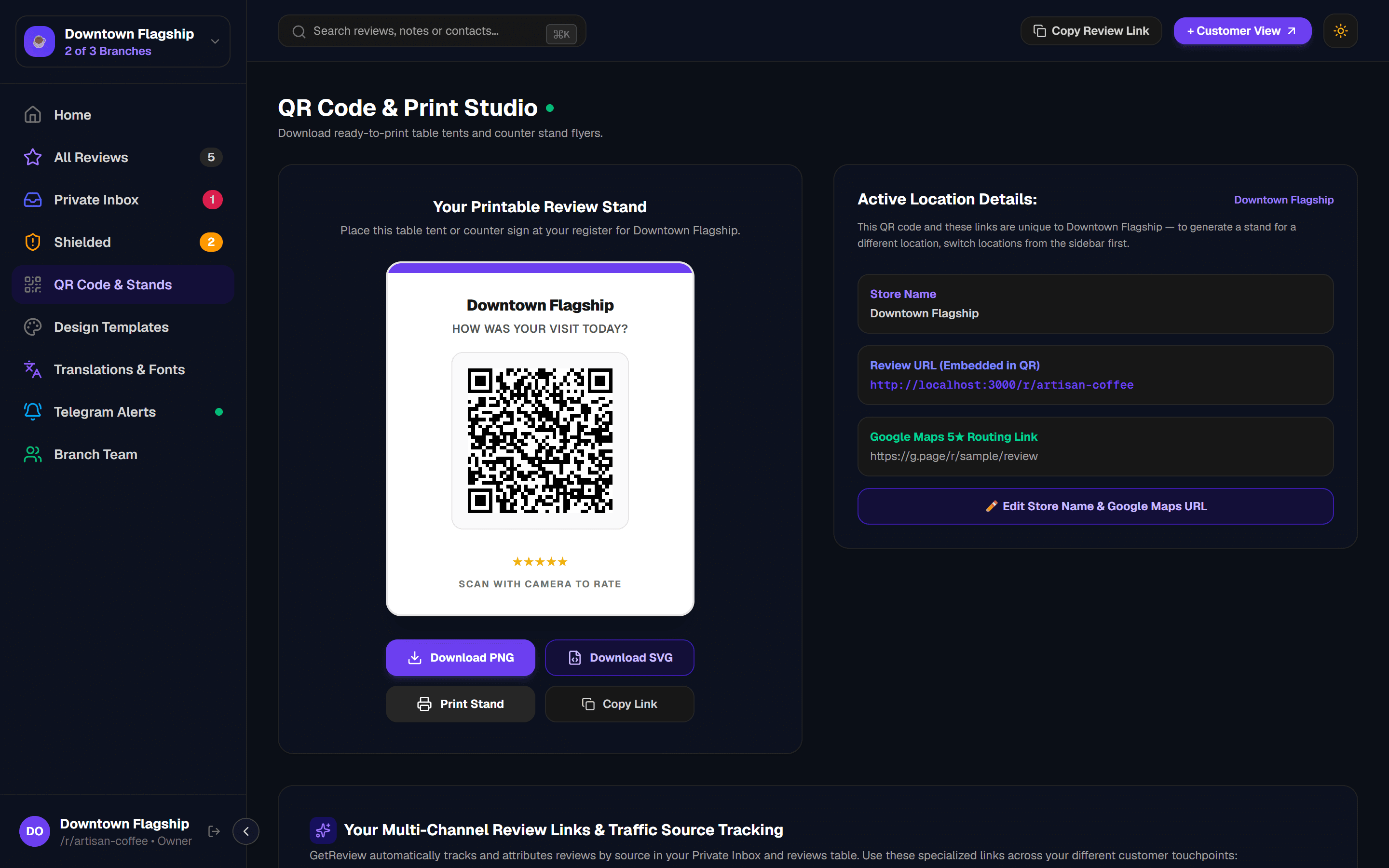
Every branch on GetReview generates a high-contrast QR code engineered with Level-H error correction — ensuring rapid camera scans even under dim restaurant lighting or through scratched acrylic holders.
Vector SVG Format
Infinite scalability without pixelation. Ideal for sending to commercial print shops for large signage.
Raster PNG (Transparent)
High-density 2000x2000px asset with alpha transparency for digital menus, social graphics, and flyers.
3Printable Stand & Flyer Studio
You do not need graphic design software. GetReview automatically compiles your store branding, QR code, and bilingual instructions into a formatted print stylesheet ready for standard office printers.
Open QR Code & Stands in Dashboard
Navigate to the "QR Code & Stands" tab on the left sidebar of your merchant dashboard.
Select Active Branch
Verify that the top location switcher is set to the branch where the stands will be physically placed.
Click "Print Table Stand"
Click the print button. A clean, high-DPI print dialog appears with all margins and cut lines pre-calculated.
Fold or Insert into Acrylic Stand
Fold along the dashed guide lines to create a triangular self-standing tent, or trim along the border for 4x6 inch acrylic holders.
Recommended Paper Stock
4NFC Tap Chip Programming
NFC (Near Field Communication) enables customers to simply tap the top of their smartphone to launch your review funnel in under one second — with no camera app required.
Writing this URL to any standard NFC chip (NTAG213 / NTAG215) takes less than 5 seconds using free smartphone apps like NFC Tools (iOS & Android).
1. Open NFC Tools
Download the free "NFC Tools" app on any iPhone or Android phone.
2. Add URL Record
Tap "Write" → "Add a record" → "Custom URL / URI" and paste your NFC link.
3. Tap Chip to Write
Tap "Write" and hold your phone against the physical stand or card to encode.
5Multi-Channel Source Tracking
GetReview tracks the physical channel used by every customer so you can measure whether your table tents, counter stands, or NFC tap blocks generate the highest conversion rate.
| Channel Source | URL Parameter | Common Placement | Dashboard Badge |
|---|---|---|---|
| QR Code Scan | ?src=qr | Table tents, receipts, window stickers | QR Scan |
| NFC Tap | ?src=nfc | Acrylic tap stands, wooden table blocks | NFC Tap |
| Direct Link | /r/[slug] | SMS follow-ups, email receipts, bio links | Direct Link |
6Placement & Staff Training Tips
Having hardware in your store is only effective when positioned correctly. Follow these proven operational standards:
Checkout Counter Stand
Place an acrylic stand next to the credit card terminal at eye level for high visibility during payment.
Table-Side Bill Presenter
Include a small QR card or NFC coaster inside the receipt book when handing the bill to seated guests.
Exit Window Sticker
Position an eye-level sticker on the main exit door reminding guests to share their experience on their way out.
Staff Verbal Prompt
Train baristas and servers to say: "If you enjoyed your coffee today, feel free to tap the stand on your way out!"
7Hardware & QR FAQs
Next Guide