

Merchant Dashboard Overview
Your central command centre for managing reviews, customer feedback, QR campaigns, team members, and live Telegram alerts — all in one place.
Dashboard URL
https://getreview.app/dashboard1Dashboard Overview
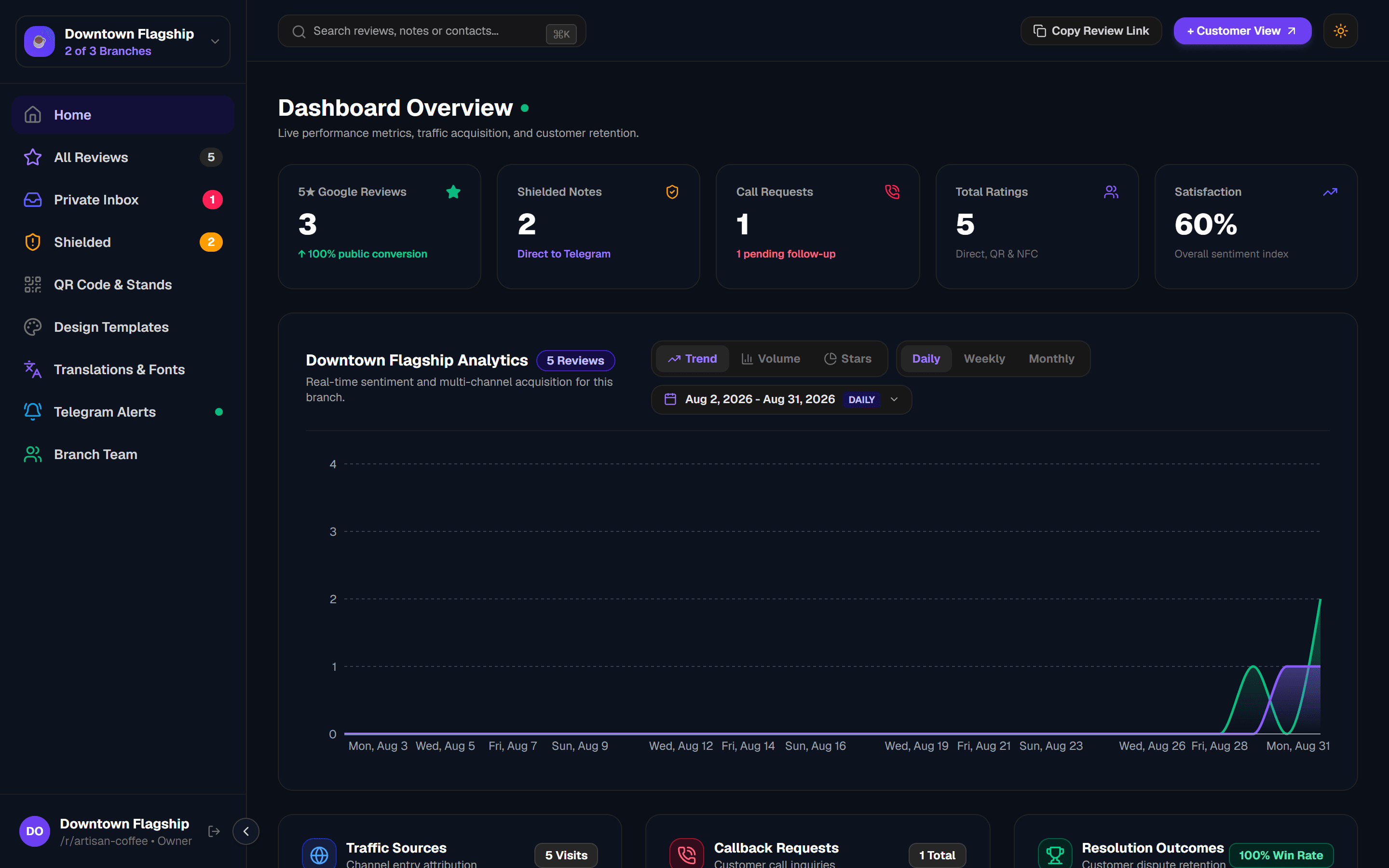
After signing in at /login, you land directly on your merchant dashboard. The sidebar on the left gives you access to every major feature. The main panel shows content for whichever section is active.
All Reviews
Full table of public 5★ reviews and internal feedback with 3-step CRM resolution actions.
Private Inbox
Low Ratings customer feedback routed internally. CRM resolution statuses (Won/Lost/No Answer).
Low-Rating Notes
1–3 star reviews caught by Feedback Routing. Forwarded directly to your Telegram.
QR Code & Stands
Download or print your store's QR code for table coasters, counter cards, and NFC stands.
Design Templates
Interactive Emoji Reaction Bar with 3D graphics, Dark/Light modes, and custom logos.
Translations & Fonts
One-click Spanish, French, German, or English presets with customizable typography and fonts.
AI Assistant & Outreach
Multi-LLM integration (Google Gemini, Groq, OpenAI, Anthropic Claude, xAI, OpenRouter), auto language detection, and smart reply generator.
Saved Reply Templates
Organize pre-approved apology, voucher, and manager outreach messages for rapid customer resolution.
Telegram Alerts
Real-time Telegram notifications for every private note and callback request.
Branch Team
Add shift managers and staff members with read-only or limited access per branch.
2KPI Summary Cards
Five at-a-glance performance cards appear at the top of your Home tab. They update automatically every 5 seconds.
5★ Google Reviews
Total customers who clicked through to Google Maps and left a public 5-star review via your review funnel link.
Low-Rating Notes
Direct customer feedback (1–3 stars) privately routed to your internal inbox for swift resolution.
Call Requests
Customers who clicked "Request a Callback". Badge turns red if pending callbacks remain unresolved.
Total Ratings
All ratings received across all channels: Direct link, QR code scans, and NFC tap stand interactions.
Satisfaction %
Overall sentiment index. Calculated as the percentage of positive (4–5 star) ratings vs. all ratings received.
Multi-Location Note
3Analytics Chart & Trend Breakdown
Directly below the KPI cards on the Home overview screen, the interactive analytics chart visualises your review volume and sentiment trends over time. Hover any data point to inspect the exact date and count, or switch between Daily, Weekly, and Monthly filters.
Chart Visualization Modes
4All Reviews Table & CRM Actions
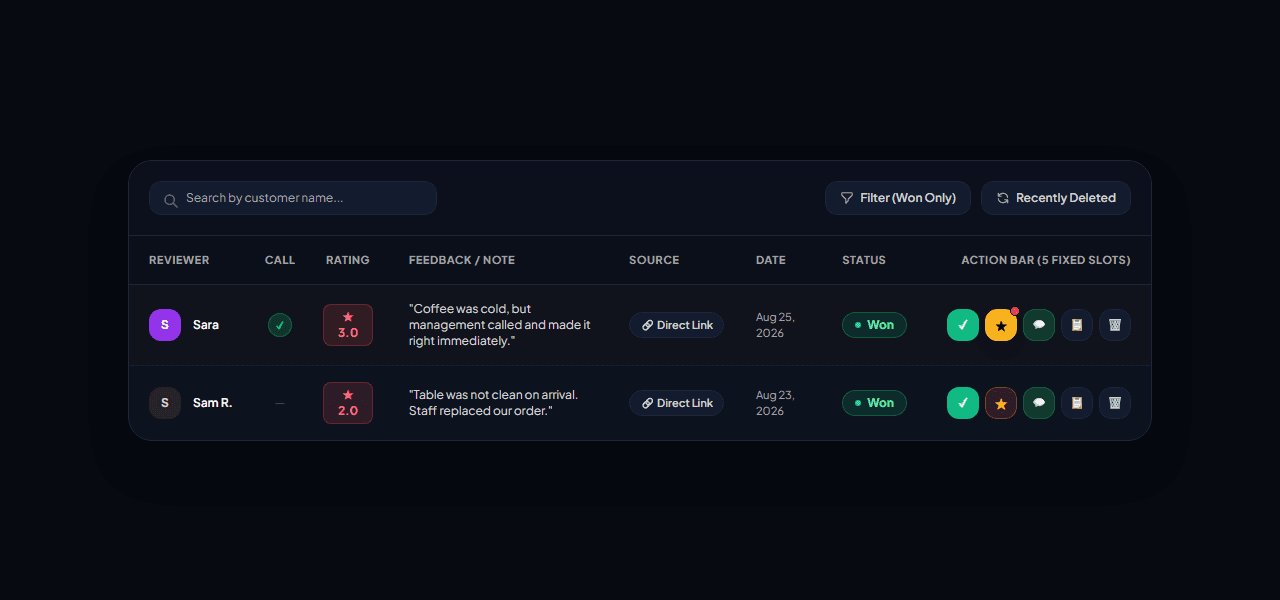
The All Reviews tab shows every customer who went through your review funnel, including those directed to Google Maps and those private. Every customer row features a full 3-step CRM action workflow for rapid communication, dispute tracking, and 5-star review recovery.
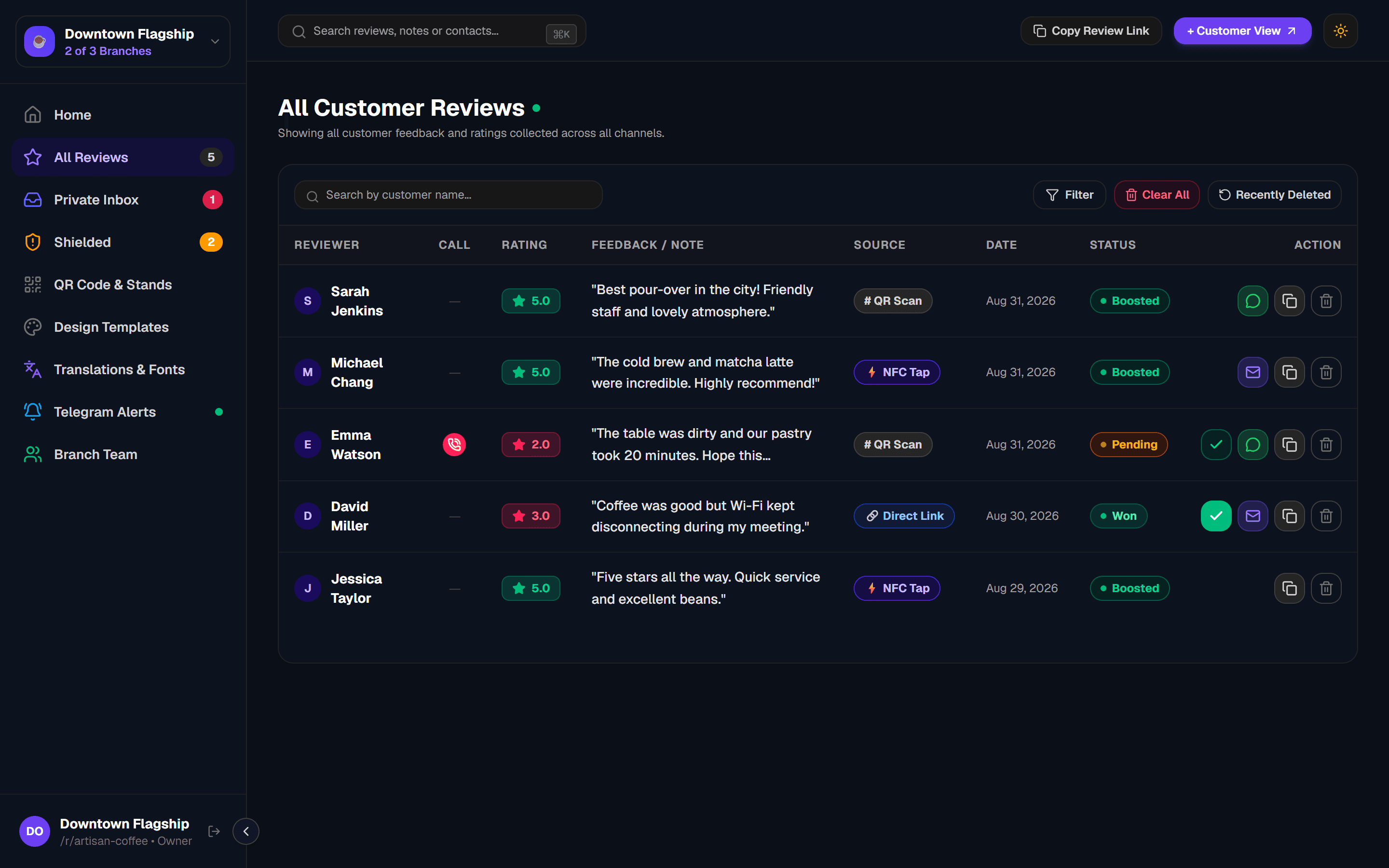
Step 1: Direct Customer Reachout & AI Recovery Modal
Clicking the chat bubble (MessageCircle) icon on any customer row opens the Customer Outreach & Recovery Modal. Powered by your active LLM, it detects the customer's language, writes an empathetic apology, and generates an instant owner translation.
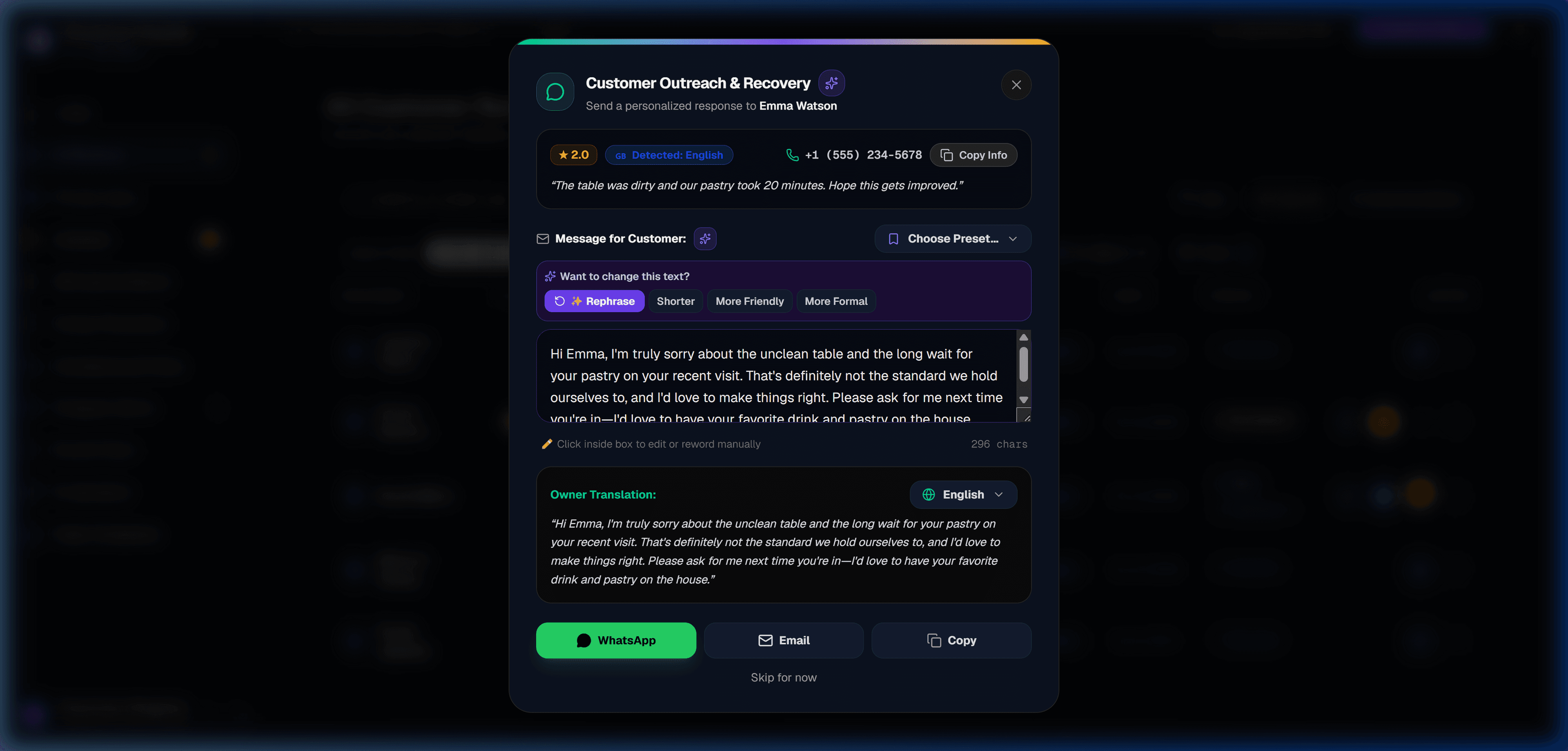
Strict Google Compliance: Zero Review Links in Step 1
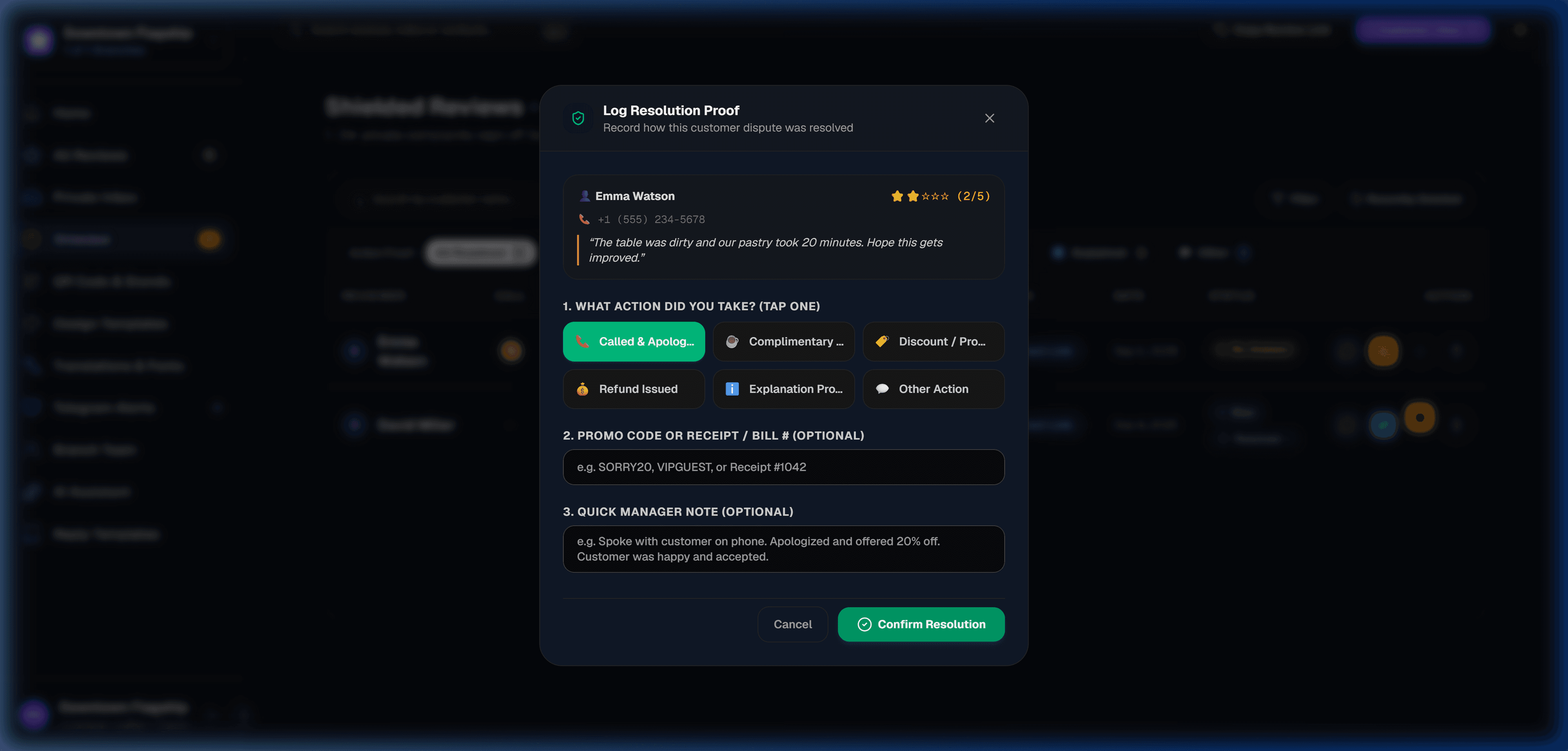
Step 2: Log Dispute Resolution Outcome & Action Proof
Clicking the checkmark button opens the Resolution Outcome Menu. Managers record the exact status of each complaint and attach actionable proof of resolution.
✅ Won / Solved
Customer dispute successfully resolved. Unlocks Step 3 (Win-Back Star) to invite them to leave a 5★ Google review.
📵 No Answer
Staff called or messaged the customer but received no response after multiple attempts.
❌ Lost
The issue could not be reconciled or the customer declined management offers.
🏷️ Action Proof Badges Strip
Filter resolved cases in 1 click by specific action taken: Called (📞), Complimentary Item (☕), Discount Code (🏷️), Refund (💰), or Explained (ℹ️).
Step 3: 5★ Customer Win-Back Google Review Follow-up
Once an issue is logged as Won, the Win-Back Star (⭐) comes alive. A gentle bounce animation alerts staff that the customer is satisfied and ready to be asked for a public 5★ review on Google.
5Private Inbox
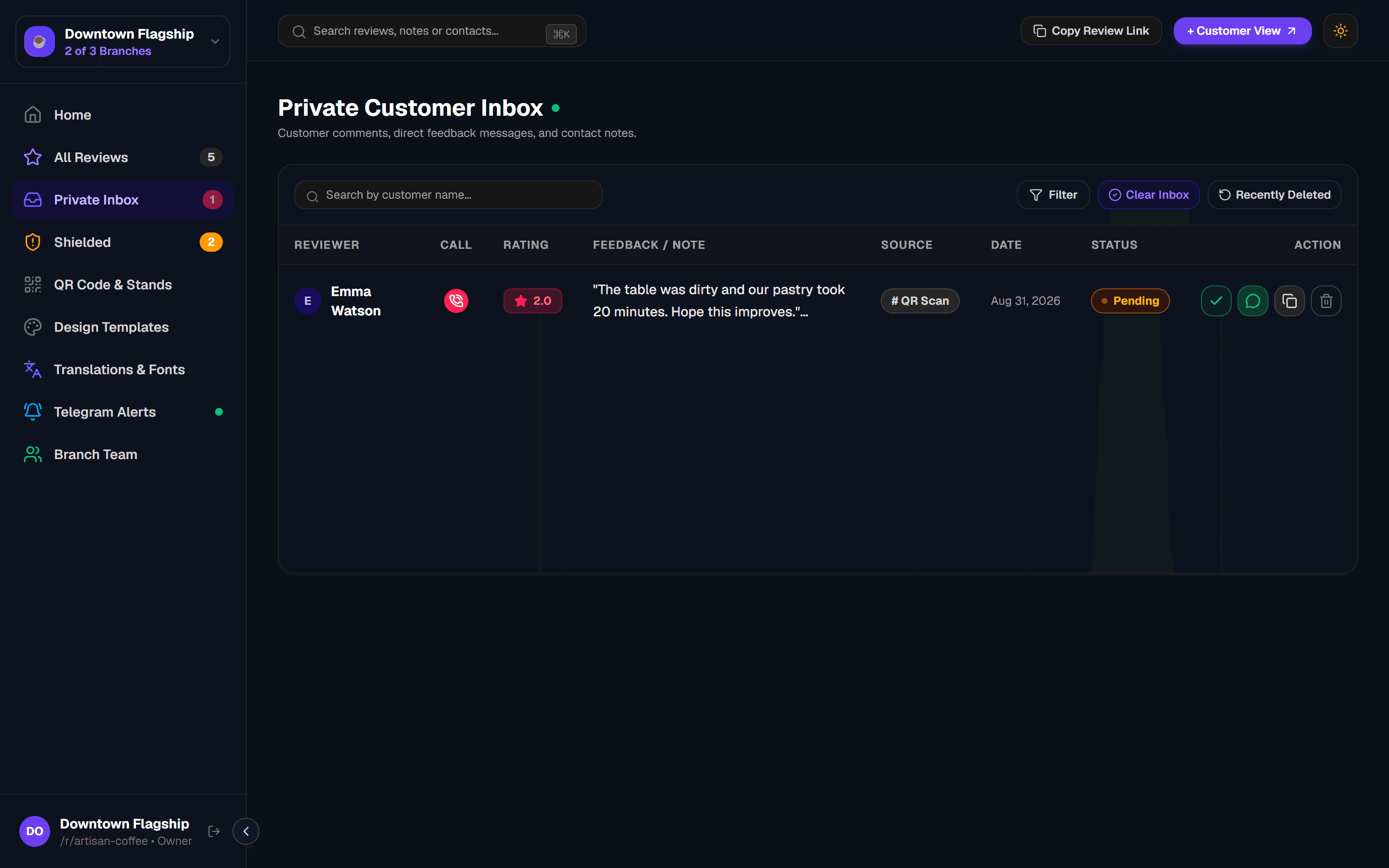
The Private Inbox tab is your internal customer care queue. It shows feedback from customers who rated 1–3 stars and submitted an internal note or requested a callback for staff resolution.
Direct Management Care
6Low-Rating Notes
Low Ratings is the real-time output of Feedback Routing — direct customer feedback received privately. Each entry here is also forwarded instantly to your Telegram group or private channel.

Feedback Routing Rule
7QR Code & Stands
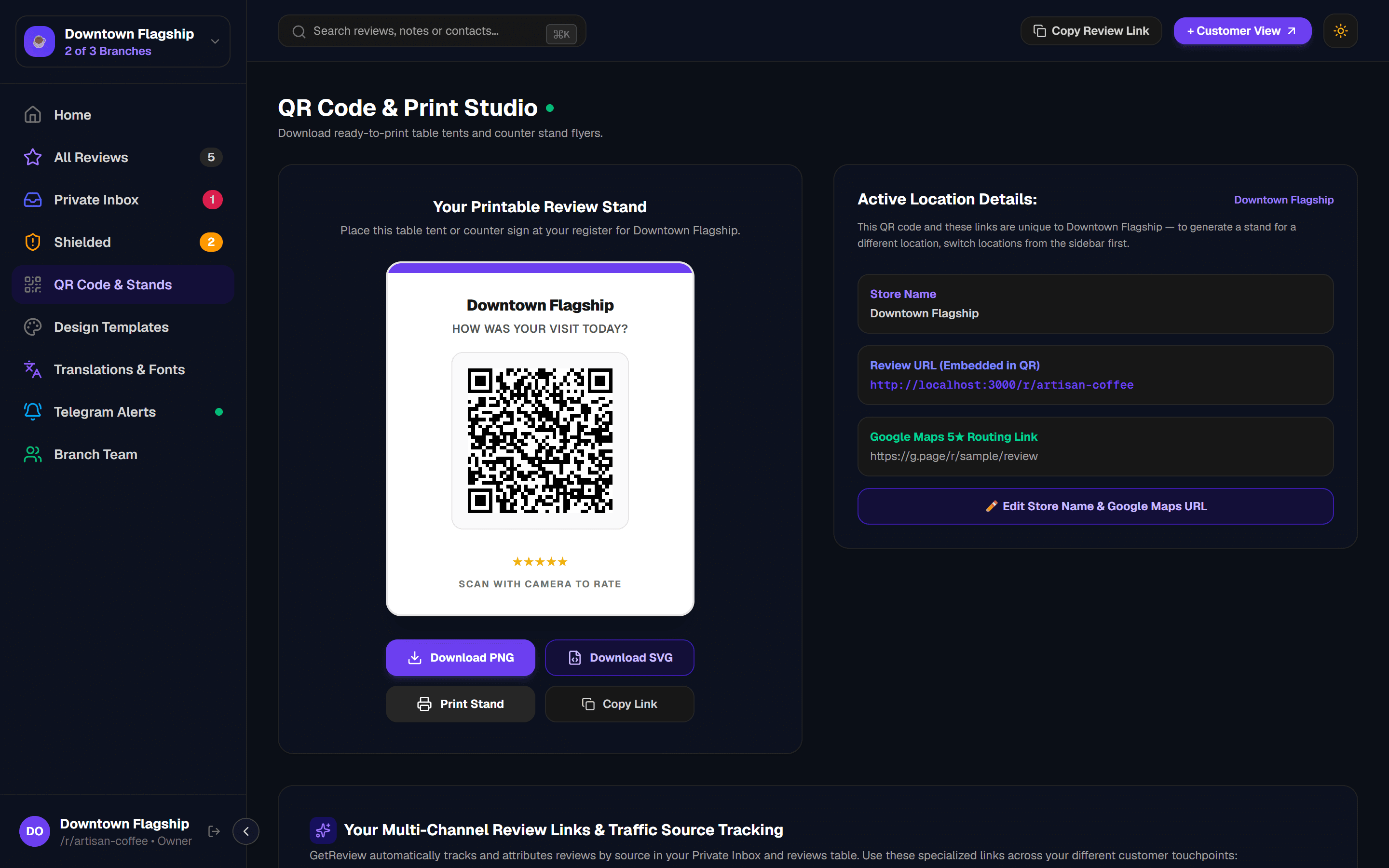
The QR Code & Stands tab lets you download your store's review QR code in SVG or PNG format, and generate a print-ready NFC stand card. Customers scan the code and are taken directly to your branded review landing page.
8Design Templates Studio & Emoji Reaction Bar
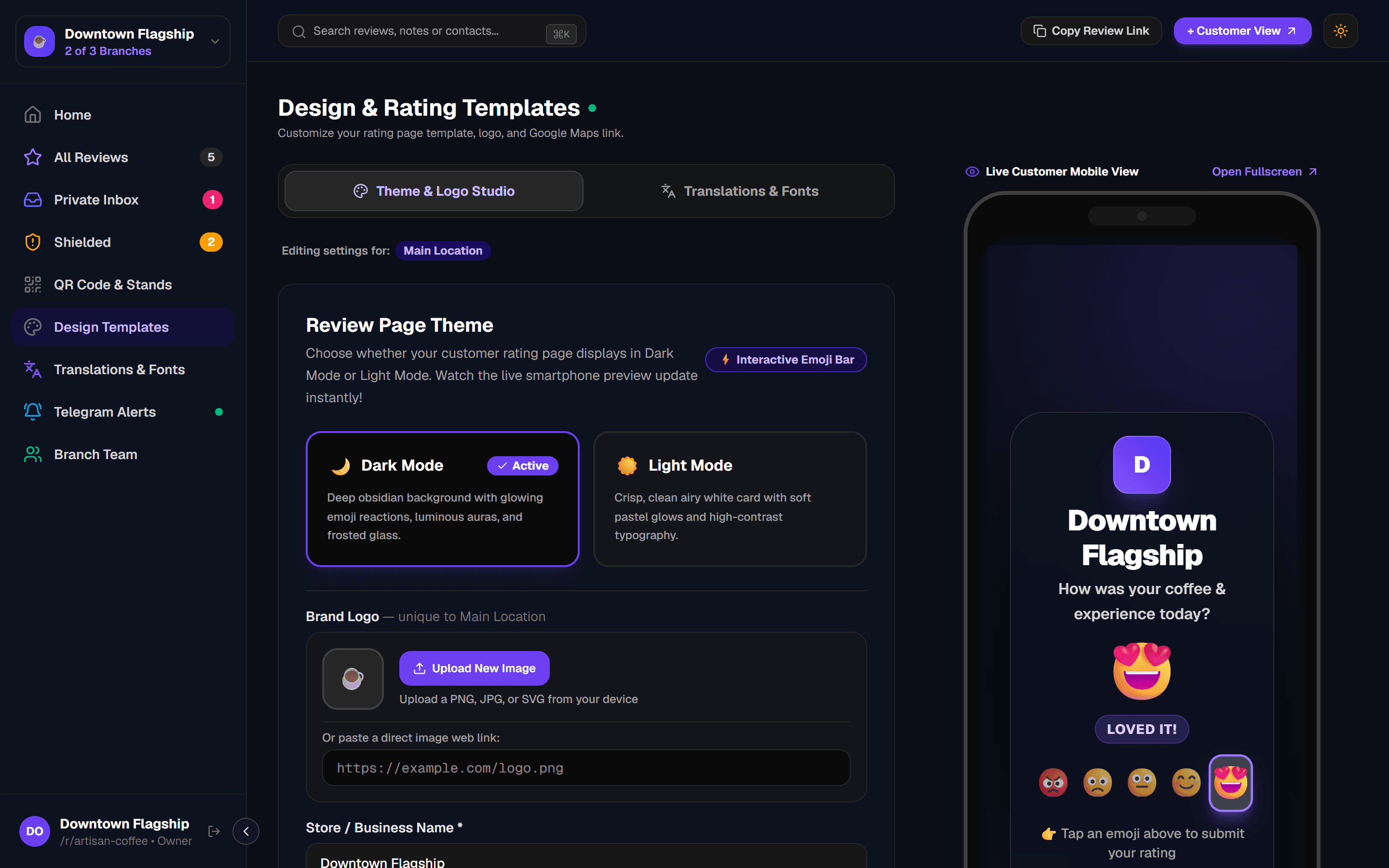
Customise your brand presentation on the signature Interactive Emoji Reaction Bar review card that customers see when they scan your QR or tap your NFC stand. Toggle between Obsidian Dark and Clean Light modes, select your brand accent colour, upload your logo, and watch the live smartphone simulation update in real time.
New: Interactive Emoji Reaction Bar (3D Physics)
Equipped with high-definition custom 3D emoji faces ranging from Terrible to Loved It! with smooth tactile animation physics, dynamic backlight illumination, and seamless dual-routing logic.
Preview Mode
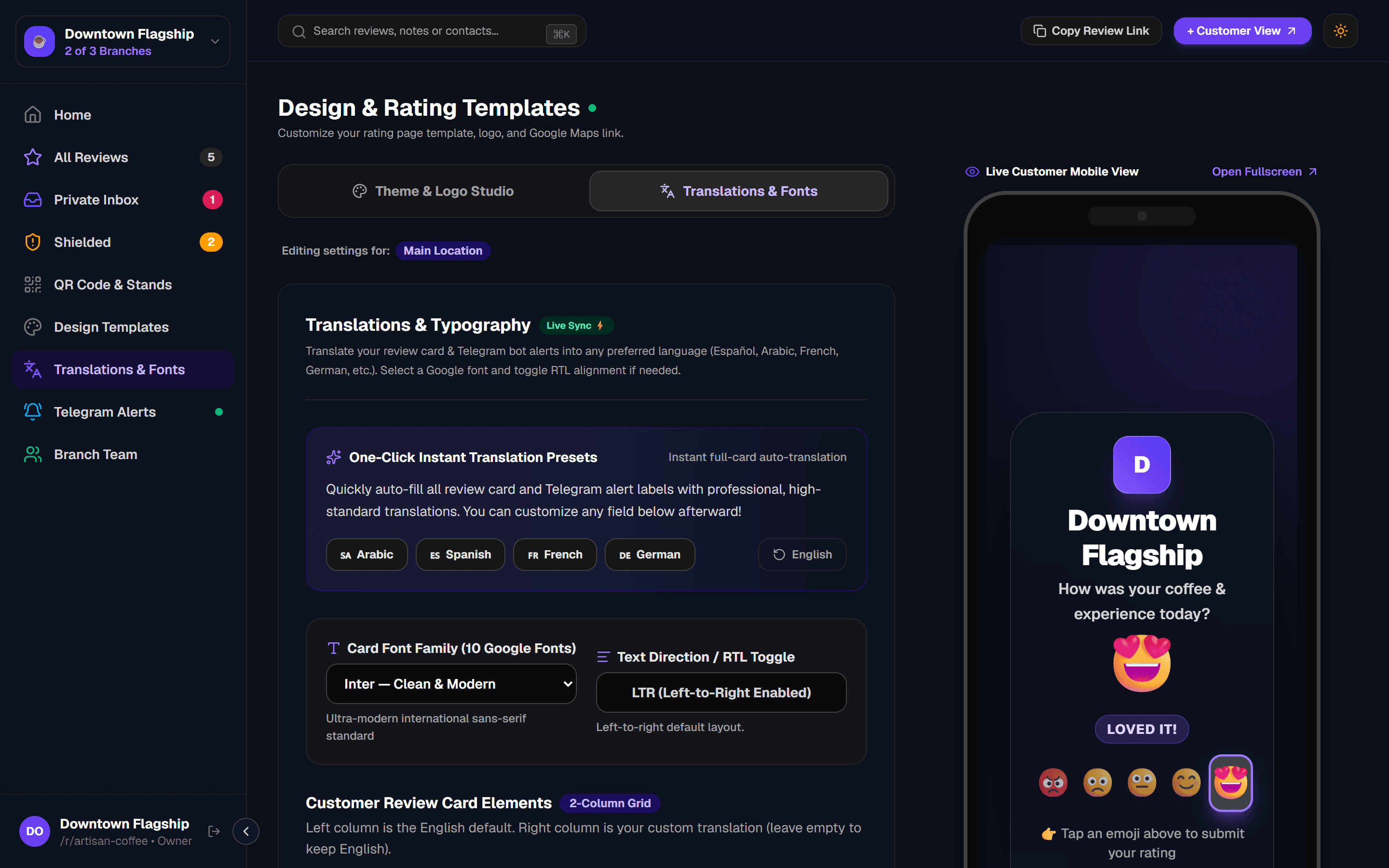
9Translations & Fonts
Serve international customers in their preferred language. Apply one-click presets for Spanish, French, German, or English, or customize every label individually with 10 Google Fonts.
10Telegram Alerts
GetReview can send real-time alerts to any Telegram group or private channel whenever a customer leaves a private note or requests a callback. Connect once and your team gets notified immediately.
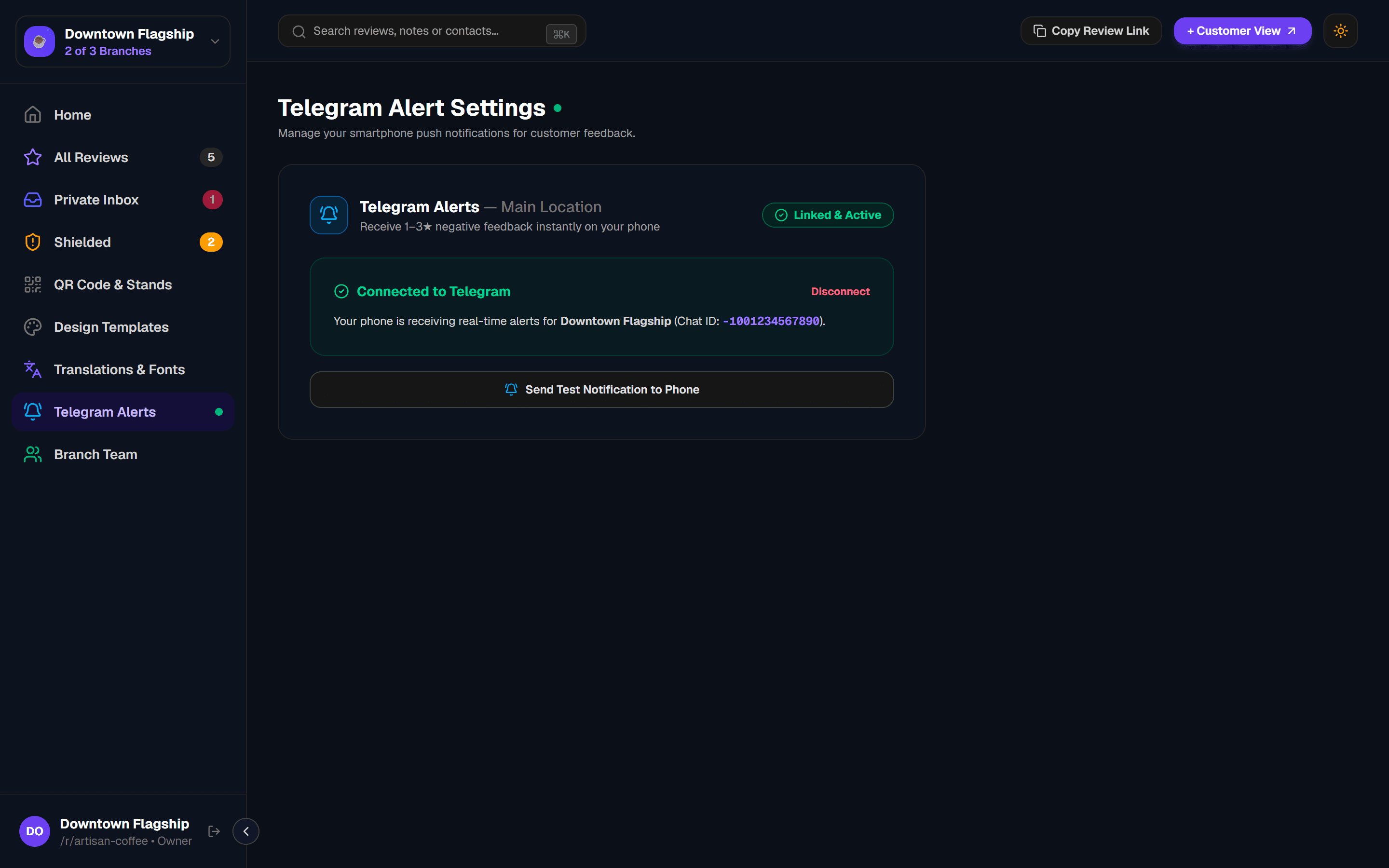
Per-Branch Telegram Connections
11Branch Team
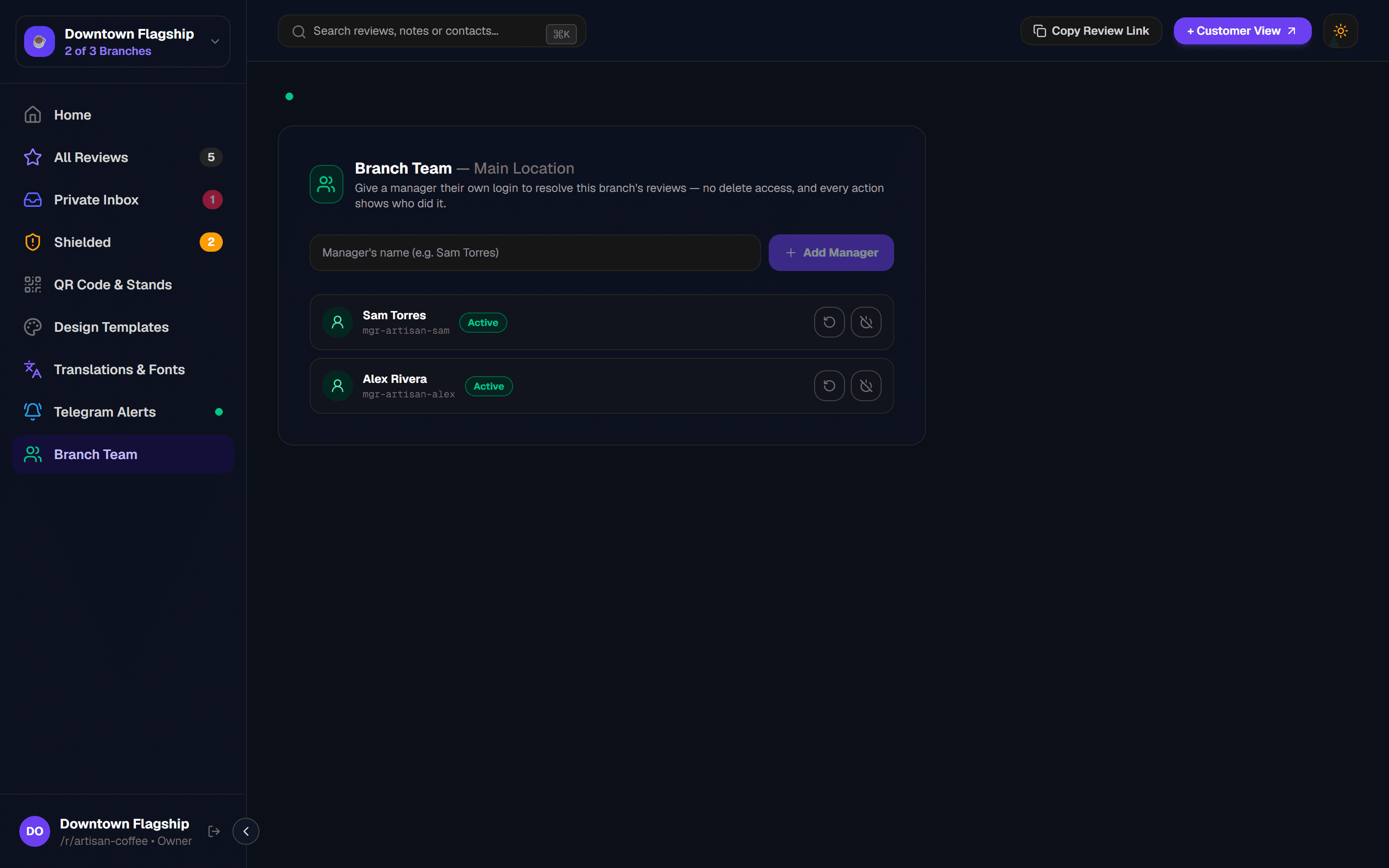
Add shift managers and team members to your branch so they can monitor the Private Inbox and resolve customer feedback — without sharing the owner's login credentials.
Security Tip
/manager-login — a separate portal from the owner dashboard. They can view and resolve inbox items but cannot access billing, templates, or Telegram settings.12Multi-Location Switcher
If your business has more than one branch, use the location switcher at the top of the sidebar to switch between them. Each location has its own QR code, slug, team, reviews, and Telegram connection.
Main Location
Your primary branch. Changes here affect the business-wide Telegram fallback.
Branch Locations
Up to 3 total locations on the Pro plan and 10 on the Business plan. Each branch is fully independent with its own QR, reviews, and manager logins.
Add New Location
Click "+ Add New Location" at the bottom of the switcher dropdown. Requires available slots.
13AI Assistant & Auto-Outreach
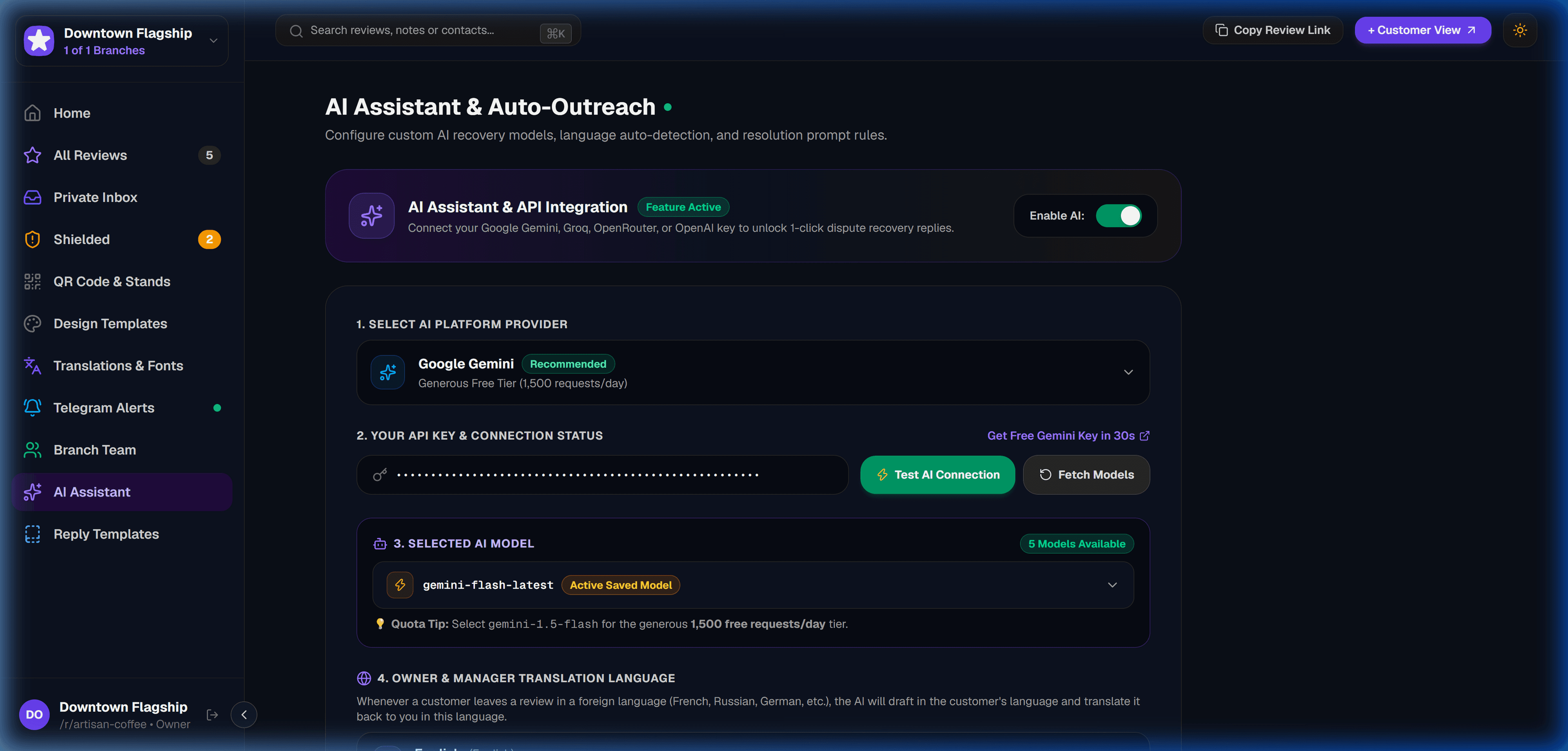
Configure your business’s AI customer recovery engine. Connect your preferred LLM provider, customize store instructions and manager signatures, test API connectivity with live latency pings, and empower your staff to generate instant, culturally tailored apologies in 1 click.
Multi-Language Auto-Detection
When an unhappy guest leaves feedback in Spanish, French, or German, the AI Assistant detects the language, generates a tailored response, and gives you an English owner translation.
BYOK (Bring Your Own Key)
Full flexibility to use your own Google Gemini, Groq, OpenAI, or OpenRouter keys. Requests are sent directly to your model with zero markup on token usage.
?Frequently Asked Questions
Next: Smart Feedback Routing
Learn how the dual-routing funnel captures private customer feedback and resolves complaints before public escalation.